
PC system requirements: minimum & recommended specs, FSR 3, DLSS 4.5 and performance settings.
PC System Requirements & Best Settings
Yes, most mid-range PCs from the last five years can run Dragon's Dogma 2 now. Capcom lowered the official floor with Title Update 3.2 to a Core i5-8500 or Ryzen 5 3500 with a GTX 1660 or RX 5500 XT, and Title Update 4.0 added FSR 3 frame generation plus DLSS 4.5 with multi-frame generation. As of the Dark Arisen launch (October 9, 2026), minimum spec targets 1080p at 45-60 FPS with FSR, while recommended holds 1080p 60 FPS or 4K at 45 FPS.
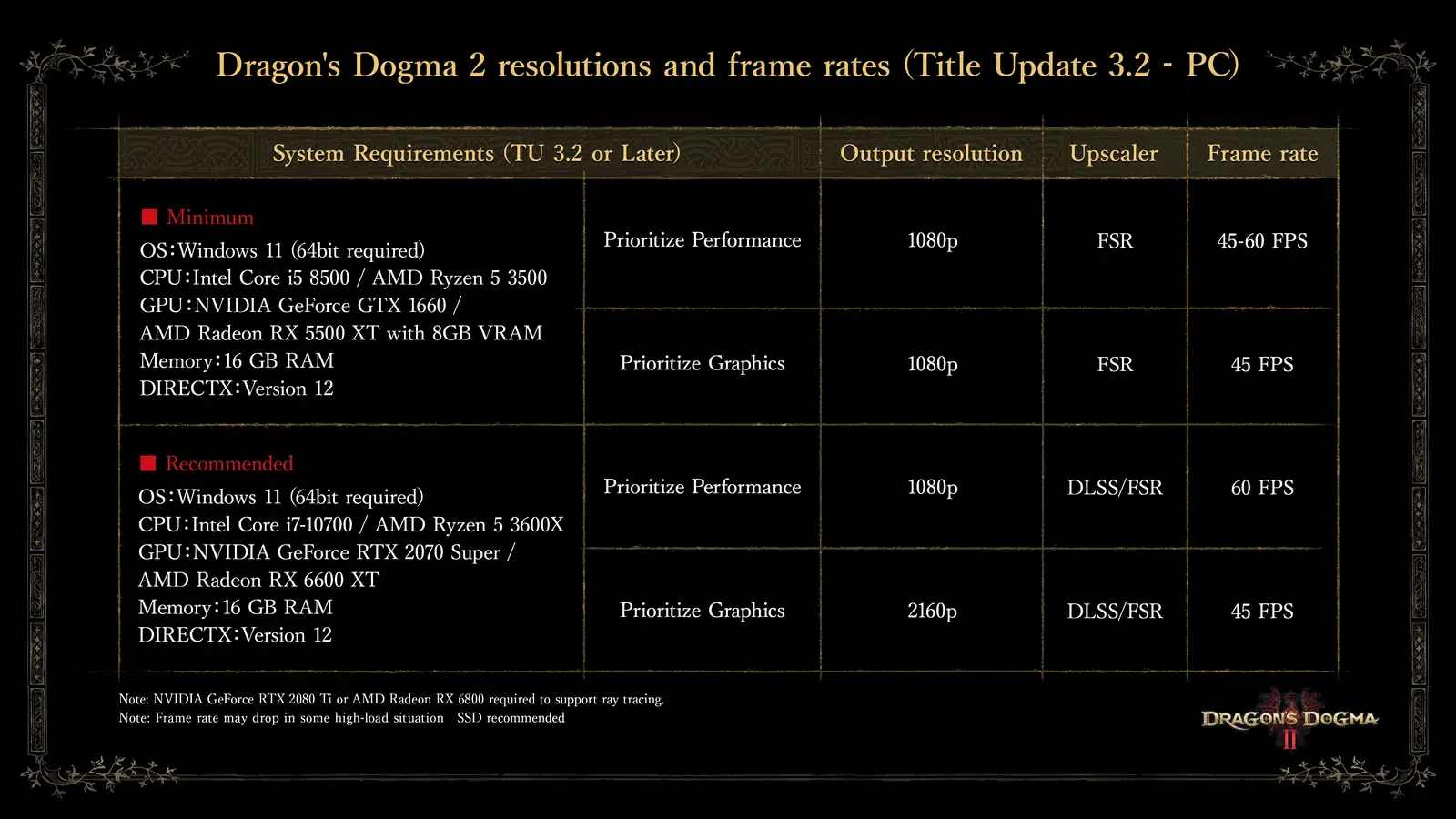
Minimum and Recommended Specs at a Glance
The table below is transcribed from Capcom's official resolutions and frame rates chart for Title Update 3.2 on PC (TU 3.2 or later, so it covers the Dark Arisen launch build).
| Tier | OS / CPU / GPU / RAM | Mode | Output | Upscaler | Frame rate |
|---|---|---|---|---|---|
| Minimum | Windows 11 64-bit, i5-8500 / Ryzen 5 3500, GTX 1660 / RX 5500 XT (8GB VRAM), 16GB RAM, DirectX 12 | Prioritize Performance | 1080p | FSR | 45-60 FPS |
| Minimum | Same as above | Prioritize Graphics | 1080p | FSR | 45 FPS |
| Recommended | Windows 11 64-bit, i7-10700 / Ryzen 5 3600X, RTX 2070 Super / RX 6600 XT, 16GB RAM, DirectX 12 | Prioritize Performance | 1080p | DLSS / FSR | 60 FPS |
| Recommended | Same as above | Prioritize Graphics | 2160p (4K) | DLSS / FSR | 45 FPS |
Three footnotes from the same official chart matter as much as the table: ray tracing needs at least an RTX 2080 Ti or RX 6800, frame rates can dip in high-load situations, and an SSD is recommended. Storage is the one row the chart does not print: media roundups describe a roughly 100GB-class SSD footprint, but the Steam store API was throttled during the launch window, so keep at least 100GB free and treat that number as approximate. The live Steam store page carries the current requirements block for cross-checking.
Official source: Dragon's Dogma 2 Title Updates page carries the full TU 3.2 and TU 4.0 notes, including the revised requirements, FSR 3 frame generation, and DLSS 4.5 changes quoted on this page.
What Title Update 3.2 Changed
The 3.2 requirements are meaningfully lower than the launch-day ones. At release, the Steam minimum asked for a Core i5-10600 or Ryzen 5 3600 with a GTX 1070, which locked out a large group of older but still capable machines. The revised floor drops two CPU generations to the i5-8500 and steps the NVIDIA floor sideways to the GTX 1660.
| Component | Launch minimum (2024) | TU 3.2 minimum (current) |
|---|---|---|
| OS | Windows 10 / 11 64-bit | Windows 11 64-bit |
| CPU | i5-10600 / Ryzen 5 3600 | i5-8500 / Ryzen 5 3500 |
| GPU | GTX 1070 / RX 5500 XT 8GB | GTX 1660 / RX 5500 XT 8GB VRAM |
| Memory | 16GB RAM | 16GB RAM |
| DirectX | Version 12 | Version 12 |
Two things to read carefully. First, Windows 10 vanished from the official floor, so Windows 10 machines run below spec even if the game still launches. Second, 16GB of RAM survived every revision and is the row old laptops fail most often. Our launch patch rundown covers everything else 3.2 and 4.0 changed, and the PC Gamer requirements analysis documents the original launch requirements for comparison.
Frame Generation: FSR 3 and DLSS 4.5
Title Update 4.0, released alongside Dark Arisen on October 9, 2026, overhauled the upscaling stack. This is the largest free performance upgrade the PC version has received.
| Feature | What 4.0 changed | Who benefits |
|---|---|---|
| FSR 3 frame generation | Added to the Graphics options menu | All GPUs including AMD and older NVIDIA cards |
| DLSS Super Resolution | Version raised to 4.5 | RTX cards |
| DLSS multi-frame generation | Frame generation now supports multi-frame mode | RTX 40/50-series cards |
| DLSS frame generation without upscaling | Usable even with DLSS Super Resolution turned off | RTX owners who want native rendering plus generated frames |
Frame generation arrived in stages, which explains conflicting advice in older threads. Basic DLSS frame generation dates back to mid-2024; a pause-menu stutter and a reversed Performance/Quality toggle were fixed in later patches. If you followed a settings guide written before October 2026, its upscaling section is outdated. GTX 16-series owners should use FSR plus FSR 3 frame generation, since DLSS is RTX-only. The Steam status page tracks the PC build overall, and the PCGamesN Denuvo report dates the DRM removal to early September 2026.
Set resolution, upscaler, and preset first, then toggle frame generation and check feel in a busy town. Generated frames raise the counter without lowering input latency, so a 45 FPS base that feels fine becomes smooth while a stuttery 25 FPS base stays stuttery.
Best Settings by Hardware Tier
Capcom's chart assumes two presets, Prioritize Performance and Prioritize Graphics, combined with an upscaler. The table below maps those official targets onto three real hardware tiers.
| Your hardware | Preset | Upscaler + frame gen | Expected result |
|---|---|---|---|
| At or near minimum (GTX 1660 / RX 5500 XT class) | Prioritize Performance, 1080p | FSR on, FSR 3 frame generation on | 45-60 FPS in the open world, dips in towns |
| Mid-range (RTX 3060 / RX 6600 XT class or better) | Prioritize Performance, 1080p or 1440p | DLSS or FSR Quality, frame generation on | Locked 60 FPS in most areas |
| Recommended or better (RTX 2070 Super and up) | Prioritize Graphics, up to 4K | DLSS / FSR, multi-frame generation on supported RTX cards | 45 FPS at 4K, 60 FPS at 1080p |
Three rules cover nearly every setup question. First, match the upscaler to your card: DLSS on RTX, FSR everywhere else. Second, leave headroom for Norgan: the expansion's snowfields are denser than the base map, and the official high-load warning was written with scenes like these in mind. If you plan to head north soon, read the level and prep guide first. Third, integrated graphics sit below the stated floor: nothing in the official chart covers iGPUs.
Ray Tracing, SSD, and Denuvo Notes
Ray tracing is the one feature with its own hardware gate: an RTX 2080 Ti or RX 6800 at minimum, per the official chart. Enabling it on a minimum-spec card costs far more frames than the lighting upgrade is worth, so treat it as a recommended-tier-and-above option only.
The SSD note deserves emphasis because slow drives cause symptoms players blame on the GPU: texture pop-in, hitching at region borders, and long inn-rest loads. The chart says SSD recommended rather than required, but on a spinning drive the open world streams poorly enough that an SSD is effectively mandatory. Back up saves before any hardware shuffle with the save backup guide.
One last piece of good news: Capcom removed Denuvo anti-tamper software around September 2, 2026, and community testing credits the removal plus the 3.2 optimizations with a real uplift. If your impression of PC performance dates to the rough 2024 launch, it is stale. If anything still goes wrong after tuning, the troubleshooting guide collects the known DLC-era fixes in one symptom table.
FAQ
Can my GTX 1660 run Dark Arisen? Yes. The GTX 1660 is the current official minimum GPU. Expect 1080p at 45-60 FPS on Prioritize Performance with FSR and FSR 3 frame generation, with dips in the busiest scenes.
How much RAM and storage do I need? 16GB of RAM in every official tier, plus roughly 100GB of free SSD space. RAM is exact; storage is approximate because the Steam API was throttled at launch, so keep 100GB free to be safe.
Should I use DLSS or FSR? DLSS on RTX, FSR on everything else. As of Title Update 4.0, DLSS is at 4.5 with multi-frame generation on supported cards, while FSR 3 frame generation covers all GPUs.
Does ray tracing need a specific card? Yes: an RTX 2080 Ti or RX 6800 minimum, per Capcom. Below that, leave the toggles off.
Did the PC version get faster since launch? Yes. Title Update 3.2 lowered requirements, 4.0 added FSR 3 frame generation and DLSS 4.5, and Denuvo was removed around September 2, 2026. Pre-October-2026 performance complaints describe a different build.
Related Guides
- Troubleshooting: DLC Access & Common Fixes - symptom table for crashes, missing quests, and settings that refuse to stick.
- Dragon's Dogma 2 on Steam - the PC build at a glance, from Denuvo removal to player numbers.
- Patch Notes: Title Update 4.0 & DLC Changes - full 4.0 and 3.2 contents behind the spec changes.
- Dark Arisen Level Requirement: When to Enter Norgan - what your rig should handle before the snowfields, plus prep checklist.
- Save Location & Backup Guide (PC/PS5/Switch 2) - back up saves before driver updates, reinstalls, or drive swaps.
More Dragon's Dogma 2: Dark Arisen Guides
Dark Arisen level requirement: Norgan level 40, Lost Rites level 20, plus prep checklist before you go.
Dark Arisen price & editions: $29.99 DLC vs $49.99 bundle, Switch 2 bundle-only, what to buy.
Dark Arisen review roundup: Metacritic score, Steam rating, critic verdicts and is it worth it?
Dragonsplague explained: symptoms, combat buffs, Dragonsbaulk Draught cure and keep-or-cure strategy.
Eternal Ferrystone guide: how to get it from Brant, how to use fast travel with Portcrystals.
Hard Mode guide: how to enable, difficulty changes, old saves, and whether to start fresh or NG+.
How to change appearance: character creator, mid-game changes, pawn looks, new hairstyles and tattoos.
How to unlock transmog in Dark Arisen: Reaching the Far Shore quest, Hal location and Relic gear limits.